Recently there have been some posts disappearing, unintentionally, without explanation. I have discussed some theories with the effected forum members for the possible cause.
I have increased the frequency of forum observations looking for a similar situation to occur, again.
This morning I read all the most recent posts and responses. Shortly later, I noticed that a response to a thread was posted, twice, and these two responses disappeared.
I have shared this forum issue with our forum “developer”. Hopefully the issue can be identified and resolved quickly.
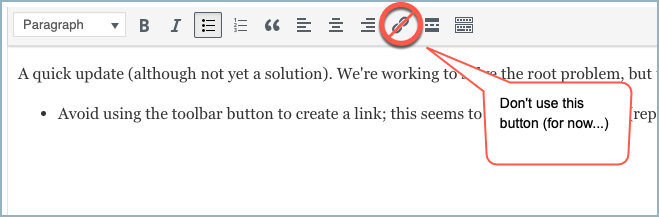
Chris, I am going to make a new post called Forum test post, it will initially be text only and I assume it will not vanish. Next I will edit it and add more text only and if it is still there, edit it again and add a forum link by just pasting in a url to another post. If that works I will add the same url with the LINK button and continue until we get a failure.
Edit #3 when I added a url to MarcH the post went bye bye.
It was located in the sub forum
Let me know what you need to do next.
Doug
PS attaching screen shot of after the fact. You do not always get this screen, many times you are just returned to the top of the post. In this case I was at the top of the post as it was the first post
Thanks all, for your great troubleshooting. It seems that any topic or reply that includes links is automatically removed until it’s approved by a moderator.
But I don’t know why this has started to happen. We run several anti-spam plugins, any one of which could’ve received a recent update that changes its behavior. So I’m in the process of looking for that needle in a haystack. In the meantime, I’ll try to keep an eye on those topics that get removed for moderation, to approve them so they’ll reappear.